
Panduan Registrasi & Login MEDIDOC
Panduan lengkap untuk melakukan registrasi dan login pada aplikasi mobile MediDoc. Ikuti langkah-langkah berikut untuk mulai menggunakan layanan kesehatan digital kami.
BAHASA INDONESIA
1. Registrasi Medidoc
Registrasi medidoc dapat dilakukan setelah data member dikirimkan oleh HR Perusahaan ke Medilink dan kemudian di set up oleh Medilink pada System.
Klik “Sign Up” pada aplikasi MediDoc
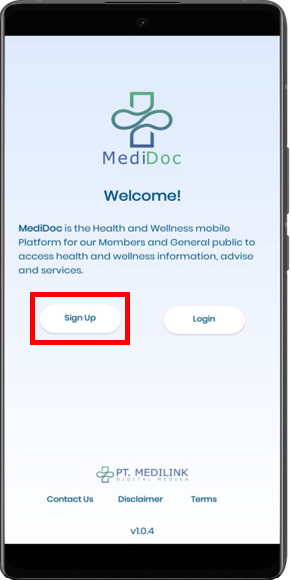
Langkah 1: Klik tombol “Sign Up”
Masukkan data berikut:
- Nama Lengkap
- NIK/No. Kartu
- Tanggal Lahir
- Jenis Kelamin
- No HP
- Password yang akan digunakan
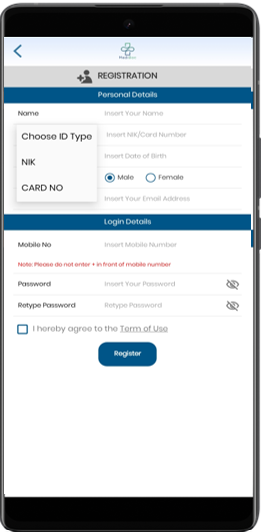
Langkah 2: Isi formulir registrasi
Catatan Penting:
- Nomor handphone disarankan menggunakan 08xxxxxxx, tidak menggunakan 62xxxxxxx
- Mohon untuk check list “I hereby agree to the Term of Use”
- NIK dapat diisi dengan Nomor Induk Kependudukan atau Nomor Induk Karyawan, menyesuaikan dengan yang didaftarkan oleh HR Perusahaan ke Medilink.
Registrasi berhasil – Pastikan checklist “I agree to Terms of Use” dicentang
2. Login Medidoc
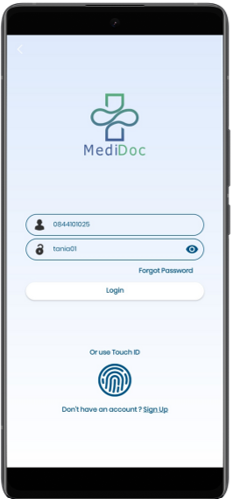
Untuk Login Medidoc dapat menggunakan user (no.hp) dan password yang sudah didaftarkan pada saat proses registrasi.
Buka aplikasi MediDoc
Masukkan nomor handphone yang terdaftar
Masukkan password
Klik tombol “Login”
Bantuan Teknis:
Apabila terdapat kendala Ketika melakukan registrasi dan login Medidoc, mohon hubungi kontak berikut:
Call Center
021 50811092
082123787982
ENGLISH
1. Medidoc Registration
Medidoc registration can be completed after the member data has been submitted by the Company’s HR to Medilink and has been set up by Medilink in the system.
Click “Sign Up” on the MediDoc app
Step 1: Click “Sign Up” button
Enter the following information:
- Full Name
- NIK / Card Number
- Date of Birth
- Gender
- Email Address
- Mobile Phone Number
- Password
Step 2: Fill registration form
Important Notes:
- Use mobile phone number in 08xxxxxxx format, not 62xxxxxxx
- Please check the box “I hereby agree to the Term of Use”
- NIK can be filled with Population Identification Number or Employee ID Number, according to what was registered by HR.
Registration successful – Make sure to check “I agree to Terms of Use”
2. Medidoc Login
For Medidoc login, use your registered username (mobile phone number) and the password created during registration.
Open the MediDoc application
Enter your registered mobile number
Enter your password
Click the “Login” button
Technical Support:
If you experience any issues during registration or login, please contact us at:
Call Center
021 5081 1092
0821 2378 7982